When a job wraps up, archive it. Archiving keeps everything but makes the project read-only and moves it out of your active list. Deleting removes the project and everything in it for good.
Only the project Owner can archive, unarchive or delete a project.
Archive a project
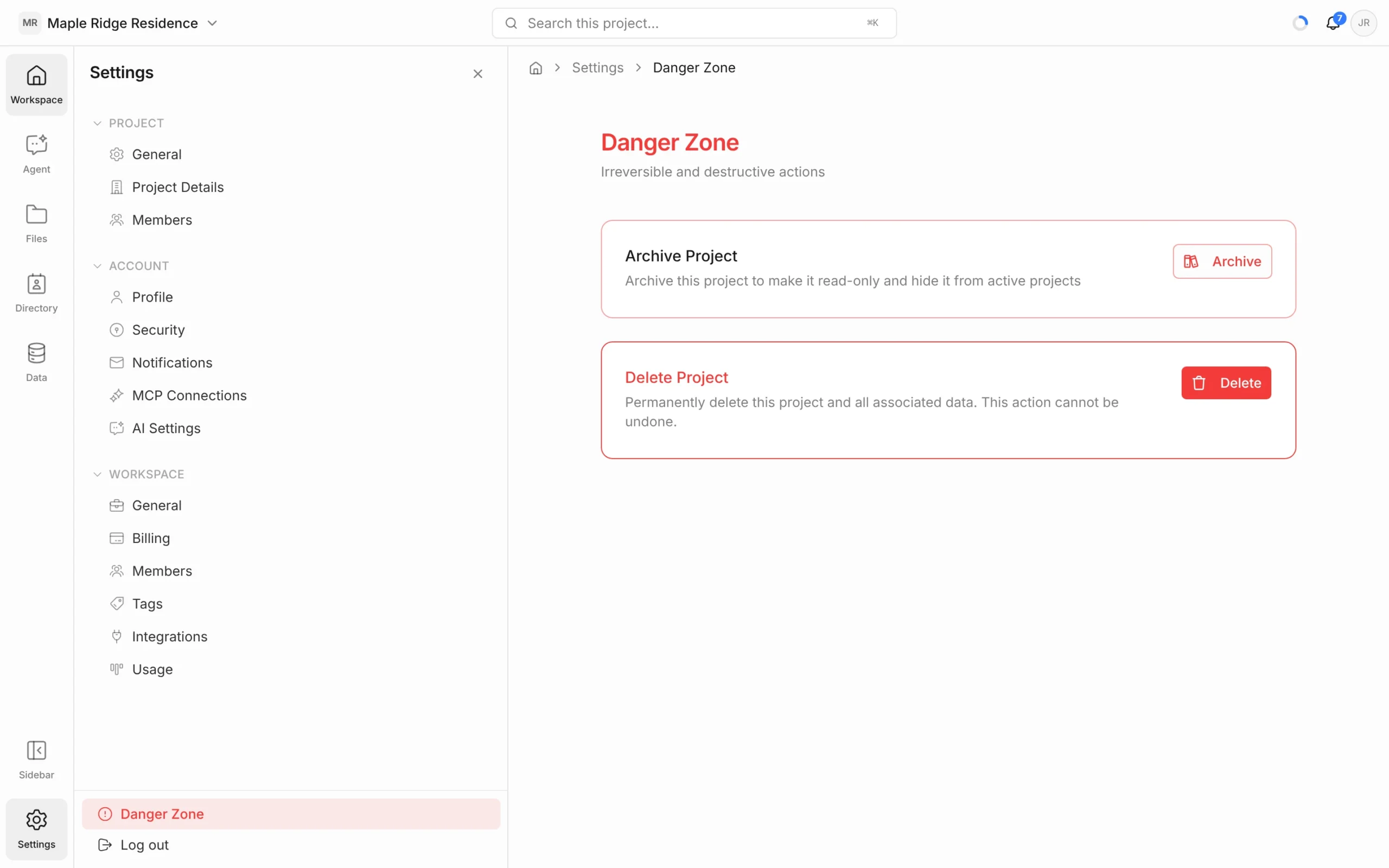
- Inside the project, click Settings at the bottom of the left rail.
- Click Danger Zone at the bottom of the settings panel.
- Next to Archive Project, click Archive.
- Click Archive Project to confirm.
You can also archive from the Projects page: click ⋯ on the project’s card, then Archive.
What archiving does
- The project becomes read-only and moves to the Archived section at the bottom of the Projects page.
- Nothing is deleted — documents, pages and chats are kept.
- Archived projects don’t count toward your plan’s project limit.
Unarchive a project
- On the Projects page, find the project under Archived.
- Click ⋯, then Unarchive.
The project goes back to your active list and can be edited again.
Delete a project
Deleting is permanent. It removes the project and all its data — documents, pages, conversations and members — and can’t be undone. If you might need the project again, archive it instead.
- Go to Settings → Danger Zone, and click Delete next to Delete Project. (Or, on the Projects page, click ⋯ on the card, then Delete.)
- Type the project’s name exactly as shown to confirm.
- Click Delete Project to confirm.