
Framework is an AI-powered document intelligence platform built for construction professionals. It lets you upload your project documents — specifications, drawings, RFIs, submittals — and instantly search them using plain English questions. Every answer comes with citations you can click to jump directly to the source page.
Think of it as a project brain: instead of hunting through hundreds of PDFs to find a specific concrete strength requirement or verify an RFI response, you simply ask and get an accurate, cited answer in seconds.
Who is Framework for?
Framework is designed for the people who spend their days working with construction documents:
- Project Managers — Track decisions, verify compliance, and manage documentation across the project lifecycle.
- Project Engineers — Quickly find specification requirements, manage RFI responses, and coordinate between design and field teams.
- Superintendents — Get field-ready answers on construction methods, materials, and installation requirements without leaving the job site.
- Estimators — Cross-reference specifications and drawings to build accurate takeoffs and verify scope.
Core Features
AI-Powered Document Search
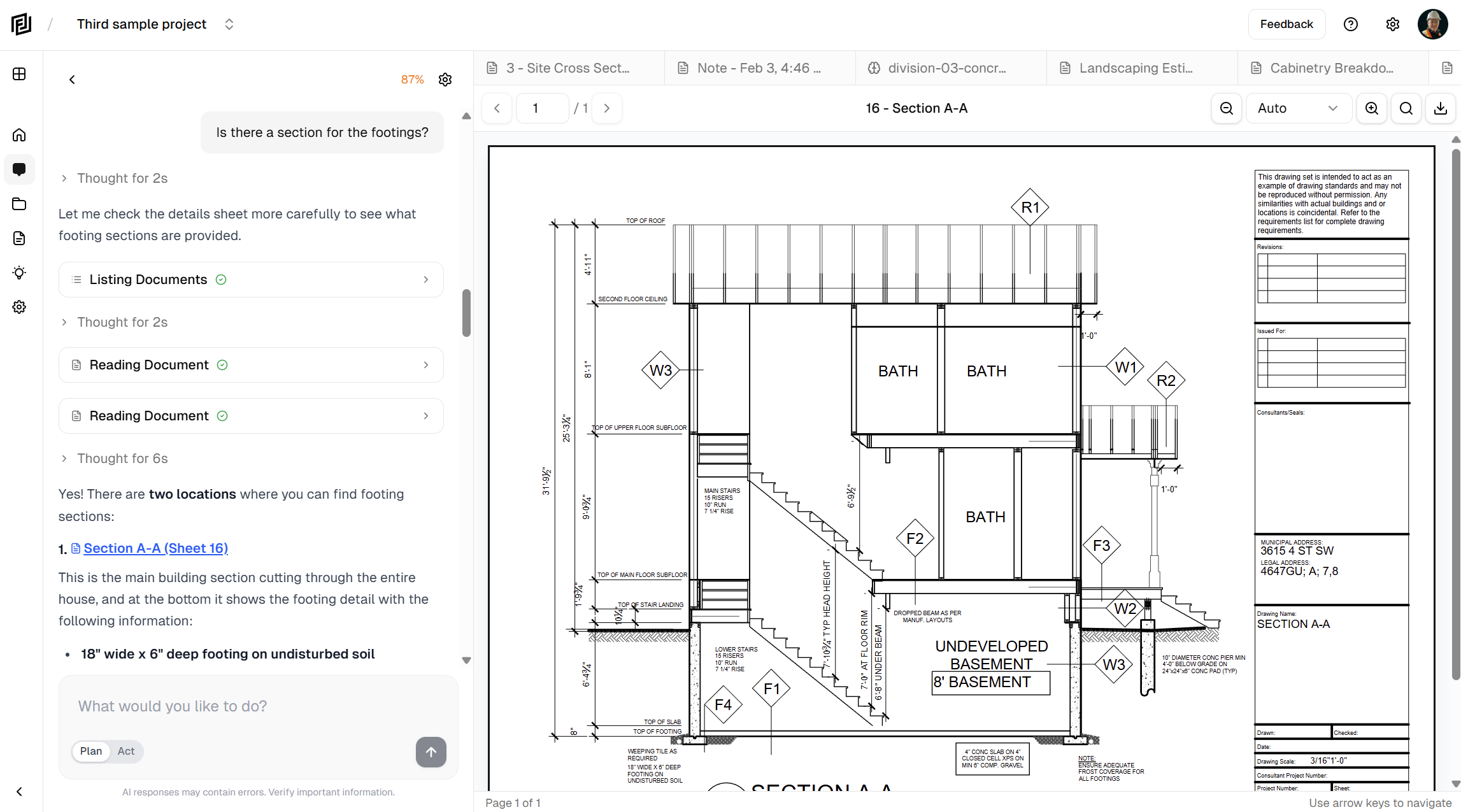
Ask questions in plain English and get precise answers pulled directly from your project documents. Framework reads and understands your specs, drawings, and other PDFs so you don’t have to dig through them manually.
Cited Answers You Can Trust
Every response includes citations — click any citation to jump directly to the exact page in the source document. No guessing, no hallucinations. You can always verify the answer yourself.
Transparent AI Process
Framework shows you exactly what it’s doing: which documents it’s searching, which sections it’s reading, and how it arrived at its answer. You’re never left wondering where information came from.
Document Management
Upload PDFs and Framework automatically categorizes them — specifications, drawings, submittals, RFIs, and more. Browse your documents in an organized tree view and open any document in the built-in PDF viewer.
AI Memory
Framework remembers context about your project across conversations. You can view and edit what it remembers, giving you control over the AI’s understanding of your project.
Notes
Create and organize project notes with a rich text editor. Keep your thoughts, meeting notes, and project decisions alongside your documents.
How It Works
The core workflow is simple:
- Upload — Drag and drop your project PDFs into Framework.
- Ask — Type a question in plain English, like “What’s the concrete strength for foundations?”
- Get Answers — Framework searches your documents, finds the relevant information, and gives you a cited answer.
- Verify — Click any citation to jump to the exact page in the source document.
What Makes Framework Different
| Traditional Approach | With Framework |
|---|---|
| Ctrl+F through individual PDFs one at a time | Search across all project documents at once |
| Manually cross-reference specs and drawings | AI connects related information automatically |
| Minutes or hours to find a specific requirement | Accurate answers in seconds |
| No way to verify AI-generated answers | Every answer includes clickable citations to the source |
| Complex enterprise software with steep learning curves | Start getting answers within minutes of signing up |
Getting Started
Ready to try Framework? Head to the next article to create your account, or jump straight to the Quick Start Guide to see how to upload your first document and start asking questions.


