
Over the last several week’s we’ve been asking you what you signed up for Framework for. The response has overwhelmingly been takeoffs and estimates.
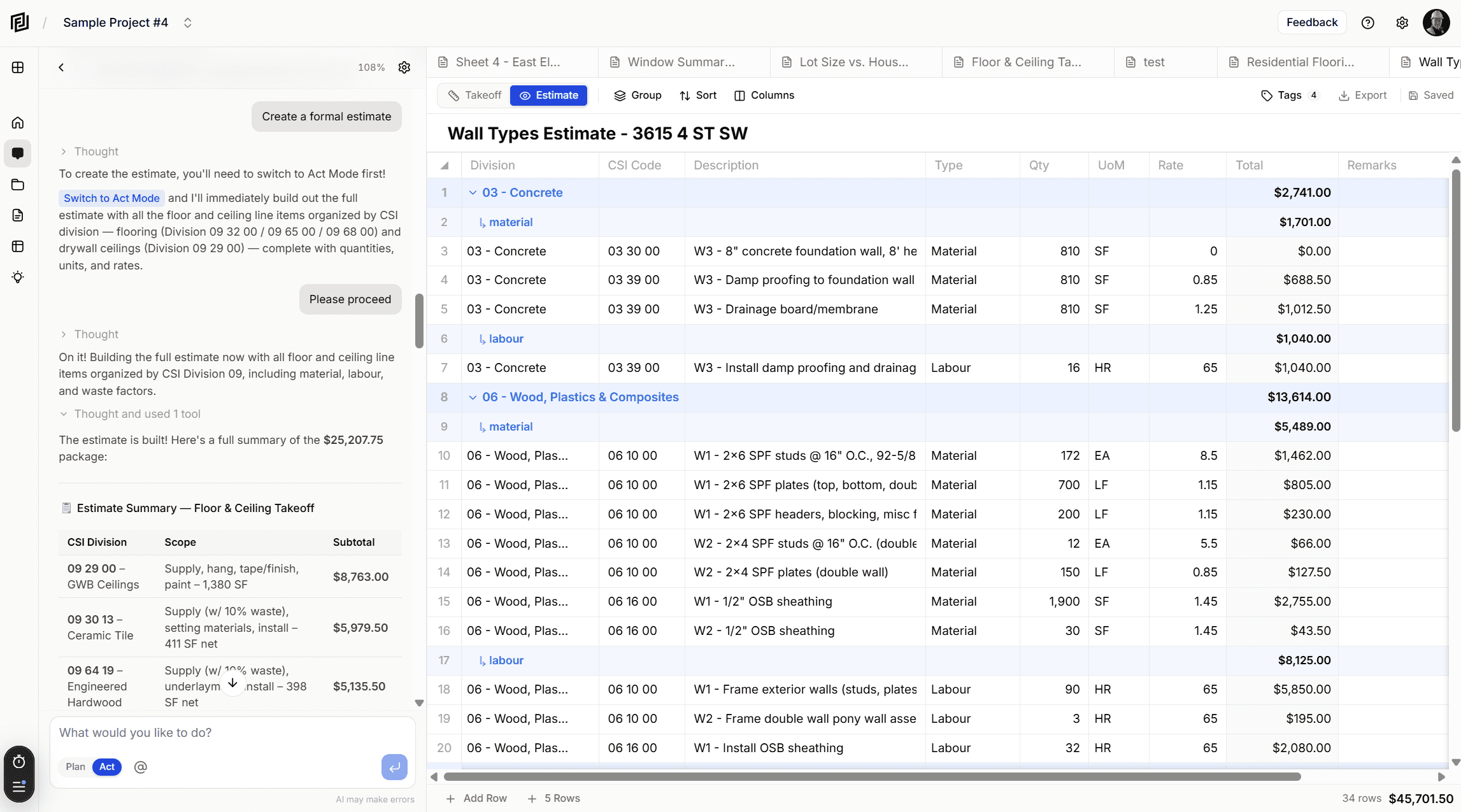
We’re excited to announce Estimates & Takeoffs — a full-featured construction cost estimating module built directly into Framework. Describe your scope in plain English, and the AI builds a structured estimate with proper CSI codes, quantities, and rates — in seconds.
Tell the AI What You Need. Get an Estimate Back.
This is the headline feature. Instead of manually building line items one row at a time, just tell your AI assistant what you’re pricing:
- “Create an estimate for a 10,000 SF office renovation”
- “Build a takeoff for the foundation scope based on the structural drawings”
- “Estimate the mechanical rough-in for the second floor”
The AI reads your uploaded project documents — drawings, specs, whatever you’ve got — understands the scope, and generates a fully structured estimate. Every line item comes back with a CSI division, code, description, type, quantity, unit of measure, and rate. You’ll see rows appear in real-time as the estimate builds, streaming live into a preview that transitions seamlessly into the full editor when it’s done.
It’s not just a rough list of items. The AI classifies everything by CSI MasterFormat division, assigns appropriate units (imperial, metric, or general), and breaks scope into materials, labour, subcontracts, equipment, fees, and allowances.
Edit and Refine With AI, Too
Creation is just the start. The AI can update existing estimates on command:
- “Increase all concrete rates by 12%”
- “Add labour costs to the drywall estimate”
- “Remove the landscaping items from the sitework takeoff”
- “Break out the electrical scope by floor”
Targeted updates, bulk adjustments, adding or removing line items — just describe what you want changed. The AI modifies the estimate in place, and if you have it open, the editor refreshes automatically so you can see the changes immediately.
A Full Spreadsheet Editor, Inside Your Project
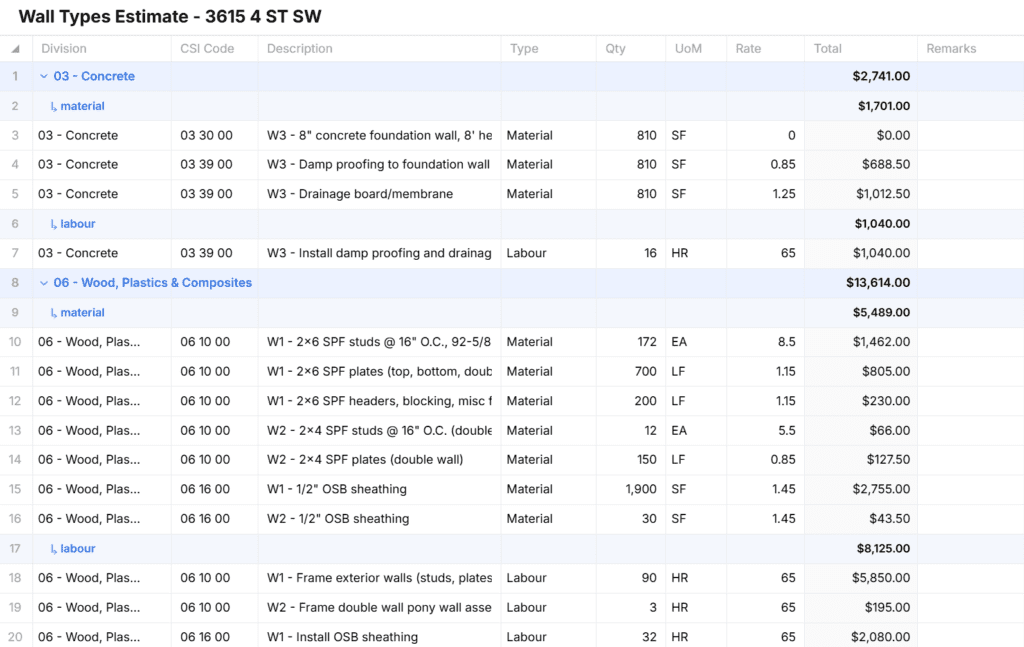
Whether you start with AI or build from scratch, the estimate editor is a proper spreadsheet grid. Inline editing, tab between cells, add and delete rows — if you’ve used Excel, you already know how it works.
Every line item includes:
- Division — dropdown with all 40+ CSI MasterFormat divisions
- CSI Code — tied to your division for proper classification
- Description — what you’re pricing
- Type — material, labour, subcontract, equipment, fee, or allowance
- Quantity & UoM — imperial, metric, or general units with grouped dropdowns
- Rate & Total — total auto-calculates as you type
Two Views: Takeoff and Estimate
Not every estimate starts with pricing. Sometimes you need to pull quantities first and add rates later. Sometimes you’re sending a takeoff to a sub and don’t want them seeing your numbers.
Toggle between Takeoff view (quantities only — rate and total columns hidden) and Estimate view (full pricing with all columns visible). One click to switch, and each view remembers its own grouping, sorting, and column settings.
Group, Sort, and Organize Your Way
Collapse your estimate by Division, Type, or any custom sort code — with subtotals calculated automatically for each group. Need to organize by floor? Add a “Floor” sort code. By phase? Add “Phase.” These custom columns work as both classification fields and grouping options.
Groups are collapsible with clear visual hierarchy — primary groups show division totals, sub-groups show breakdowns within. A running grand total and row count sit in the footer so you always know where you stand.
Export That Actually Works
When it’s time to share, export to:
- Excel (.xlsx) — with live formulas, SUM formulas on group subtotals, currency formatting, frozen headers, auto-filter, and proper column widths. This isn’t a flat data dump — it’s a working spreadsheet.
- PDF — styled tables with group headers, page numbers, headers and footers, and automatic portrait/landscape orientation based on your column count.
- CSV — for when you need raw data in another system.
Auto-Save and Tags
Every change auto-saves. A status indicator in the toolbar shows you exactly where things stand — Saved, Saving, or Unsaved. No more lost work from a browser crash or forgotten Ctrl+S.
Tag your estimates for easy filtering and organization. Tags autocomplete from previously used values across your project, so your naming stays consistent.
See It in Action
Scenario: You just received updated drawings for a commercial fit-out.
- Upload the new documents to your Framework project
- Ask the AI: “Create a preliminary estimate for the interior fit-out based on the architectural drawings”
- Watch as the estimate builds in real-time — the AI pulls scope from your actual documents and generates CSI-coded line items with quantities and rates
- Switch to Takeoff view, adjust quantities based on your own measurements
- Switch back to Estimate view, refine your rates
- Group by Division to check subtotals, then export to Excel for your proposal
The whole process that used to take hours now starts with a single sentence.
Why This Matters
Your estimates now live alongside your drawings, specs, and project notes. The AI references your actual project documents when building line items — not generic data, your documents. Everything stays in one place, connected and searchable. Faster estimates, fewer errors, less risk.
Getting Started
Estimates & Takeoffs is available now for all Framework users.
- Open any project
- Click the Estimates icon in the sidebar
- Click “+ New Estimate” to start from scratch
- Or ask your AI assistant: “Create an estimate for…”
What’s Next
This is the first version, and we’re already working on what comes next:
- Estimate templates for common project types
- Comparison views to track changes between estimate revisions
- Bid package generation with scope breakdowns by trade
- Historical cost data to inform your rates based on past projects
Ready to build your next estimate in minutes instead of hours? Log in to Framework and try Estimates & Takeoffs today.
Have feedback or feature requests? Email me directly at kyle@framework.constructoin – I read every email!
Framework is the AI-powered construction document assistant that helps you find information, create documentation, and manage your projects smarter.


