
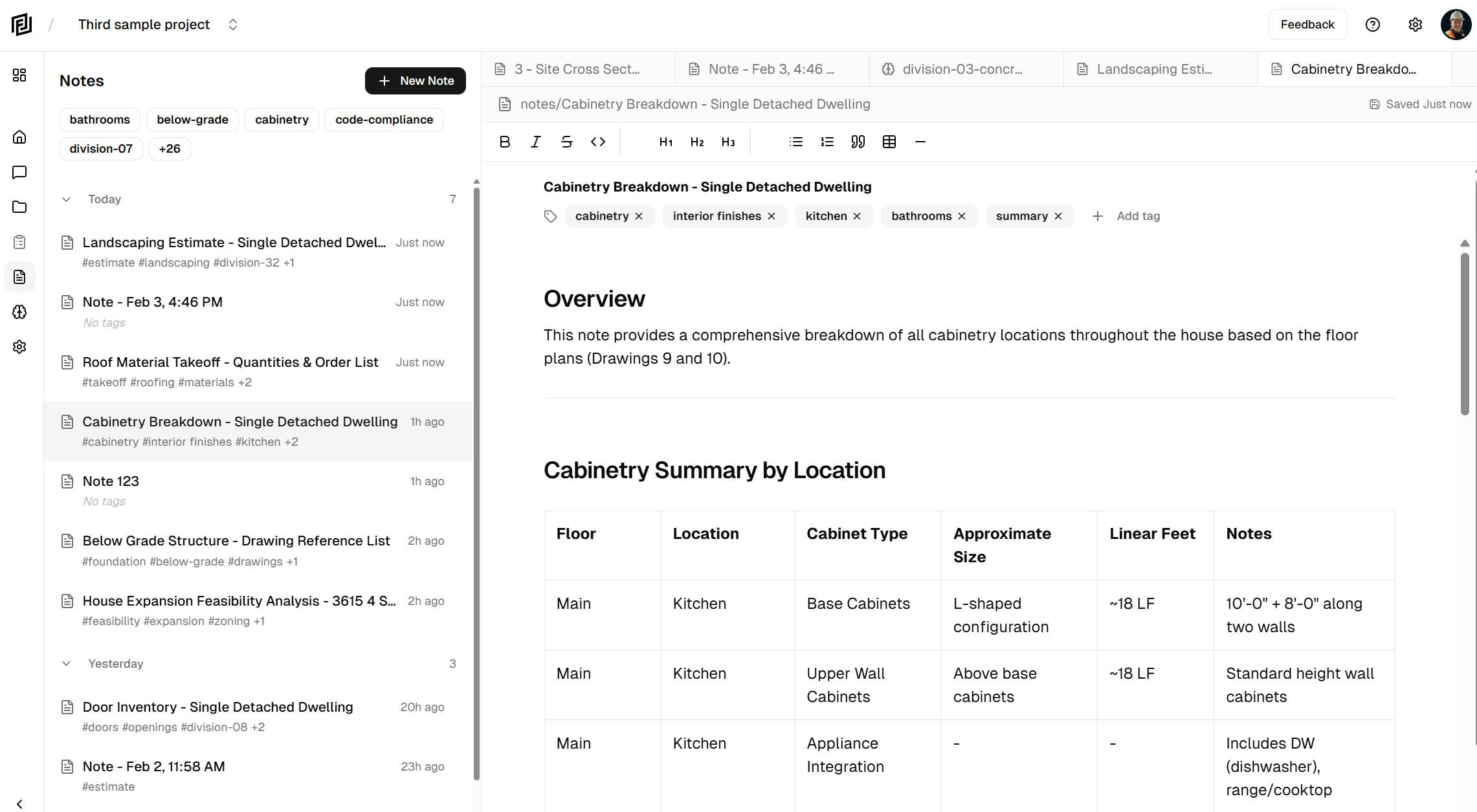
We’re excited to announce the launch of Project Notes — a powerful new feature that transforms how you document and manage information that’s presented to you by our AI models.
The problem: information overload, nowhere to put it.
During early usage, we were finding that users were getting a lot of information from the AI models in the chat window. This lead to information overload. Without somewhere to put the information it was hard to read, and understand. Furthermore, users were struggling to modify the information provided by the user.
The Solution: Notes That Work With You
Project Notes brings all your project documentation into one place — right alongside your construction drawings and specifications. But we didn’t stop at just storing your notes. We gave them superpowers.
Write Notes Your Way
Our rich text editor gives you the flexibility to create exactly what you need:
- Meeting notes with action items and follow-ups
- Cost estimates with detailed line items in tables
- Research summaries from your document analysis
- Punch lists and checklists that track completion
- Field observations and site notes
Format your content with headings, bullet points, numbered lists, code blocks for specifications, and even tables for detailed breakdowns. Drag and drop to reorganize. Type / to quickly insert any block type.
AI That Actually Helps
Here’s where it gets interesting. Your AI assistant can now create notes for you based on your conversations. Ask it to:
- “Create an estimate for the window replacement based on the spec”
- “Write up meeting notes from our discussion about the HVAC system”
- “Make a checklist of all the electrical items we discussed”
Watch as your note appears in real-time, streaming content as the AI writes. When it’s done, you can edit, refine, and save — all without switching apps.
Find Anything, Instantly
Project Notes integrates seamlessly with our universal search. Ask your AI assistant to search across all your documents AND notes simultaneously. Looking for that cost breakdown you wrote last month? Just ask.
Tag and Organize
Keep your notes organized with custom tags. Filter by category, project phase, trade, or any system that works for you. Group notes by date to see what’s recent or find something from weeks ago.
Getting Started
Project Notes is available now for all Framework users. Look for the Notes icon in your project sidebar to get started.
- Open any project
- Click the Notes icon in the sidebar
- Click “+ New Note” to create your first note
- Or just ask your AI assistant: “Create a note about…”
What’s Next
This is just the beginning. We’re building toward a complete project documentation ecosystem where your notes, documents, and AI assistant work together seamlessly. Coming soon:
- @mentions in the chat and documents to reference team members, documents, and other notes
- Note templates for common documentation types including Database style notes for creation of tabular data (think living estimates, takeoffs, etc)
- Export options for sharing outside Framework
Ready to streamline your project documentation? Log in to Framework and try Project Notes today.
Have feedback or feature requests? We’d love to hear from you – email me at kyle@framework.construction today!
Framework is the AI-powered construction document assistant that helps you find information, create documentation, and manage your projects smarter.


